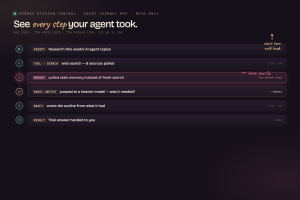
Latest Claude Update is one of the biggest changes to Claude Code because it turns Claude from a single chat assistant into something closer to a managed AI team.
Instead of running one task at a time, you can now manage multiple Claude sessions, send work into the background, and use goal-based commands that keep pushing until the job is finished.
The AI Profit Boardroom is where you can learn practical Claude workflows like this without getting stuck in theory.
Watch the video below:
Want to make money and save time with AI? Get AI Coaching, Support & Courses
👉 https://www.skool.com/ai-profit-lab-7462/about
Latest Claude Update Makes Agent View The New Control Panel
Latest Claude Update starts with Agent View, and this is the part that changes how Claude Code feels.
Before this, running multiple Claude sessions could get messy fast.
You might have different terminal tabs open, different tasks running, and no clean way to see what was happening.
Agent View fixes that by giving you one place to manage active Claude sessions.
Each session can show whether it is working, waiting, completed, failed, idle, or stopped.
That sounds simple, but it changes the workflow.
You are no longer babysitting one AI chat at a time.
Now you are managing a group of Claude sessions like a small team.
That is useful for coding, content, research, lead generation, customer support, and business operations.
The real benefit is visibility.
When you can see what every agent is doing, you can manage more work without losing control.
Claude Agent View Turns One User Into A Manager
Latest Claude Update makes you act less like a prompt writer and more like a manager.
That is a big mindset shift.
Instead of asking Claude one question and waiting for one answer, you can start tasks, move them into the background, and check back when they need input.
This makes sense for long-running work.
A Claude session can handle one job while another handles a different job.
You might have one Claude reviewing content, another fixing code, another preparing a report, and another researching a workflow.
That is much more powerful than a single chat window.
It also means your job changes.
You do not need to write every detail manually.
You need to give clear direction, review progress, and make decisions.
That is exactly how AI agents become useful in real business work.
The person who learns to manage AI agents well gets more leverage from the same amount of time.
Latest Claude Update Adds The Go Command
Latest Claude Update also adds the new go command, and this might be the most important part for actual execution.
A normal prompt usually works in one turn.
You ask a question.
Claude gives an answer.
Then the work stops.
The go command changes that pattern.
Instead of giving Claude a simple prompt, you give Claude a goal.
That goal tells Claude what completion should look like.
Then Claude keeps working toward that goal instead of stopping after one reply.
That makes Claude feel more useful for real projects.
You are not just asking it to explain what should happen.
You are asking it to keep working until the defined outcome is reached.
This matters because most valuable work is not finished in one response.
Good work needs checking, fixing, reviewing, and improving.
The go command helps Claude act more like an autonomous worker.
Goal-Based Workflows Make Claude More Useful
Latest Claude Update makes goal-based workflows much more practical.
This is different from normal prompting because the instruction is focused on the final result.
For example, a weak prompt asks Claude to write a plan.
A stronger goal asks Claude to complete the task, check the result, fix issues, and stop only when the job meets the required standard.
That is a much better way to use AI.
Most people do not need more plans.
They need finished work.
Goal-based Claude workflows can help with content systems, technical tasks, customer support processes, lead generation assets, internal documentation, and workflow cleanup.
The key is being specific.
Claude needs to know what done means.
If the goal is vague, the result will be vague.
If the goal is clear, Claude can keep moving toward a useful output.
That is why goal commands could become one of the most practical parts of Claude Code.
Latest Claude Update Brings Lead Agents And Sub-Agents
Latest Claude Update also points toward a bigger multi-agent future.
This is where lead agents and sub-agents become important.
A lead agent can break a job into smaller pieces.
Then sub-agents can handle specific parts of the work.
That is exactly how real teams operate.
One person does not do everything.
A project manager breaks the work down, assigns tasks, checks progress, and pulls everything together.
Claude is moving in that direction.
This matters because complex work usually has multiple parts.
A content workflow might need research, drafting, editing, formatting, and publishing.
A business workflow might need data cleanup, reporting, slide creation, and follow-up messages.
A coding workflow might need planning, implementation, testing, review, and documentation.
Lead agents and sub-agents make that kind of work easier to structure.
Multi-Agent Claude Workflows Are Bigger Than Coding
Latest Claude Update is not only useful for coders.
That is the part many people miss.
Claude Code sounds technical, but the workflow shift is broader than software.
If Claude can manage sessions, run agents in parallel, follow goals, and work inside business tools, it becomes useful for non-coders too.
A business owner could use it to prepare reports.
A marketer could use it to build content workflows.
An operator could use it to organize files and documentation.
A creator could use it to turn ideas into scripts, pages, and assets.
A team could use it to split repetitive tasks across multiple AI sessions.
This is why the update matters.
The interface may start in Claude Code, but the behavior is much bigger.
It is about managing work with AI agents instead of chatting with one assistant.
The people who understand that shift early will get more value from Claude.
Microsoft 365 Makes Latest Claude Update More Useful
Latest Claude Update becomes even more practical when you look at Microsoft 365.
Claude working across Excel, PowerPoint, and Word changes the normal office workflow.
Instead of copying data from one tool into another, Claude can help carry context between apps.
That means work that starts in a spreadsheet can become a document or deck without re-explaining everything.
This is useful for reports, analysis, presentations, planning documents, and business summaries.
For example, you could analyze numbers in Excel and then ask Claude to turn the findings into a slide deck.
That kind of workflow used to take a lot of manual formatting.
Now the process can become much faster.
This is one reason Claude is moving beyond simple chat.
It is becoming an assistant that can work inside the tools people already use.
That makes the update easier to apply in everyday business work.
Dispatch Lets Claude Work From Anywhere
Latest Claude Update also includes Dispatch, which makes assigning work easier.
The idea is simple.
You can assign Claude tasks by text or voice and let it keep working while you are away from your desk.
That matters because not every task should require you to sit in front of your computer.
Some work can be assigned, processed, and reviewed later.
This makes Claude feel more like a remote worker than a simple AI chat.
You give the task.
Claude works on it.
You come back and review the result.
That workflow is useful for people who manage a lot of small tasks during the day.
It could help with notes, files, documents, reports, research, and planning.
The important part is review.
Dispatch is powerful, but it still needs human oversight.
Claude can move work forward, but you should still check the output before trusting it.
Latest Claude Update Shows AI Is Becoming A Team
Latest Claude Update makes one thing clear.
AI is moving from chat to teams.
Agent View is the dashboard.
The go command is the autopilot.
Lead agents and sub-agents are the team structure.
Microsoft 365 is the office layer.
Dispatch is the work-from-anywhere layer.
Put together, this is a different way to think about AI.
You are no longer just opening a chatbot and asking questions.
You are setting up a system where multiple AI workers can handle different parts of the job.
That is a massive shift for anyone who wants to save time.
It also changes what skills matter.
Prompting still matters, but orchestration matters more.
You need to know what to assign, how to define success, when to review, and when to step in.
That is how AI becomes useful instead of chaotic.
Latest Claude Update Needs Human Review
Latest Claude Update is powerful, but it also comes with risks.
Any time you let agents work in the background, you need guardrails.
Agents can make mistakes.
They can misunderstand instructions.
They can edit the wrong file.
They can get stuck.
They can push work that looks finished but still needs review.
That is why you should not give Claude full access to anything that cannot be fixed.
Start with small tasks.
Use limits.
Check the output.
Review important changes before they go live.
This is not about being scared of AI agents.
It is about using them properly.
The safest way to trust an agent is to verify the work.
Trust by checking, not by hoping.
That is how you get the speed without creating unnecessary risk.
Safe Claude Workflows Start Small
Latest Claude Update should not make you automate everything on day one.
That is how people create problems.
A better approach is to start with one small workflow.
Pick a task that is useful but low-risk.
Let Claude run it.
Review the output.
Fix the instructions.
Run it again.
Once the workflow works, make it bigger.
This is how good AI systems are built.
Small workflows create trust.
Trust lets you delegate more.
That is much better than giving Claude too much access too early.
For example, start with internal documents before client-facing work.
Start with drafts before publishing.
Start with reports before financial decisions.
The update is powerful, but the process still matters.
A good AI workflow should be fast and safe.
Claude Code Is Becoming A Business Automation Layer
Latest Claude Update makes Claude Code feel less like a coding tool and more like a business automation layer.
That does not mean everyone needs to become a developer.
It means Claude Code is becoming a place where different types of work can happen.
You can manage agents.
You can run goals.
You can organize tasks.
You can connect business workflows.
You can review outputs.
You can coordinate multiple sessions at once.
This is useful for anyone doing repeated digital work.
Content creation is repeated digital work.
SEO is repeated digital work.
Reports are repeated digital work.
Customer support is repeated digital work.
Lead generation is repeated digital work.
Documentation is repeated digital work.
Claude can help with all of those when the workflow is clear.
That is why this update matters beyond the developer community.
The AI Profit Boardroom helps turn updates like this into practical workflows you can actually use.
Latest Claude Update Changes Content Workflows
Latest Claude Update can make content workflows much easier.
Instead of using one Claude chat to create one piece of content, you can split the job into stages.
One Claude session can research.
Another can draft.
Another can edit.
Another can repurpose the content.
Another can prepare the publishing assets.
That is a better use of AI.
It is closer to running a small content team.
The key is not to make every agent do everything.
Each agent should have a focused job.
That keeps the workflow cleaner.
It also makes quality control easier.
If one output is weak, you know which part of the process needs fixing.
This is how content systems can become faster without becoming messy.
Claude becomes more useful when the work is structured.
Latest Claude Update Can Help Lead Generation
Latest Claude Update also matters for lead generation workflows.
Lead generation has many repeatable steps.
You might need research, targeting, message drafts, follow-up sequences, offer angles, CRM notes, and reporting.
A multi-agent workflow can split those jobs into smaller parts.
One Claude session could research accounts.
Another could draft outreach.
Another could review the tone.
Another could build a follow-up sequence.
Another could summarize results.
This does not mean you should remove human judgment.
You still need to check accuracy, tone, compliance, and relevance.
But Claude can reduce the manual workload.
That is useful because lead generation often fails when the process becomes too slow to maintain.
Claude agents can help keep the workflow moving.
The goal is better execution, not spam.
Latest Claude Update Makes Customer Support Easier To Systemize
Latest Claude Update can also help with customer support workflows.
Support work often repeats the same patterns.
Questions come in.
Context needs to be checked.
A response needs to be drafted.
The issue needs to be logged.
A follow-up may be needed.
Claude agents can help organize that process.
One agent can summarize tickets.
Another can draft replies.
Another can check against internal documentation.
Another can flag cases that need human attention.
This can save time without removing the human from the loop.
That is important.
Customer support needs judgment.
An AI agent can help prepare the work, but a person should still review sensitive replies.
Used properly, Claude can help support teams respond faster and stay more consistent.
That is a practical use case for this update.
Latest Claude Update Rewards Better Management
Latest Claude Update makes AI management a real skill.
The people who get the most value will not be the people who type the longest prompts.
They will be the people who define clear goals.
They will know how to split work into smaller tasks.
They will know when to use one agent and when to use multiple agents.
They will know how to review outputs.
They will know how to set limits.
They will know when the agent is useful and when human judgment is required.
This is a different skill set from basic prompting.
It is more like managing a team.
That is why this update is important.
Claude is becoming more capable, but more capability means you need better direction.
A poorly managed AI team can create more mess.
A well-managed AI team can save serious time.
Latest Claude Update Is A Sign Of Where AI Is Going
Latest Claude Update is not just a feature drop.
It is a signal.
AI tools are moving away from one-off chats and toward managed work systems.
That means dashboards, background agents, goal-based execution, app integrations, voice assignment, and human review loops.
This is the direction most serious AI tools are moving.
The winners will not be the people who simply watch every update.
The winners will be the people who turn updates into workflows.
That is the practical part.
You do not need to use every feature immediately.
You need to understand what changed and pick the feature that saves you the most time.
For some people, that will be Agent View.
For others, it will be the go command.
For others, it will be Microsoft 365.
For others, it will be Dispatch.
Start where the leverage is obvious.
Latest Claude Update Works Best With A Simple Plan
Latest Claude Update should be used with a simple plan.
First, choose one workflow you already repeat.
Then decide what success looks like.
Next, turn that into a Claude goal.
After that, run the task in a controlled environment.
Review the output.
Fix the prompt.
Run it again.
Only expand once the workflow is stable.
This is how you avoid turning powerful tools into chaos.
Claude can now do more, but that does not mean every task should be automated immediately.
The best workflows are built gradually.
A simple working system beats a complicated broken system.
That is true for Claude.
That is true for agents.
That is true for business.
For practical Claude Code workflows, agent systems, and step-by-step AI automation training, the AI Profit Boardroom gives you a place to learn this properly.
Frequently Asked Questions About Latest Claude Update
- What is the Latest Claude Update?
The Latest Claude Update adds major Claude Code improvements like Agent View, the go command, multi-agent workflows, Microsoft 365 support, and Dispatch. - What is Claude Agent View?
Claude Agent View is a way to see and manage multiple Claude sessions in one place, including their status, progress, and whether they need input. - What does the Claude go command do?
The go command lets you give Claude a goal so it can keep working until the task reaches a defined completion state. - Can the Latest Claude Update help non-coders?
Yes, the Latest Claude Update can help non-coders with content workflows, reports, research, lead generation, customer support, and business automation. - Is it safe to let Claude agents work in the background?
It can be safe when you start with small tasks, use limits, avoid giving full access to risky systems, and review important outputs before using them.